 Job Prosperity
HOW IT WORKS
From scattered job-search activity to one clear pipeline
Set your direction, organize opportunities and recruiting email, then use visible next actions to keep the search moving under your control.
Job Prosperity is an AI-assisted workspace for managing a job search. It brings opportunities, relevant recruiting messages, stages, preferences, interviews, and next actions into one private workflow. It does not search the web for undiscovered roles, submit applications, send messages, or make career decisions for you.
The design starts from a simple idea: software can reduce organizational work while important actions remain visible and reviewable. You choose what enters the pipeline, correct assisted changes, and decide every outward action.
1. Set a useful direction
Begin with the roles, seniority, location, working style, and dealbreakers that shape a worthwhile opportunity. Clear preferences help you compare roles already in your pipeline. They do not create a guarantee of fit and do not cause Job Prosperity to discover jobs on external sources.
Keep criteria specific enough to guide a decision but flexible enough to reflect reality. Salary floors and genuine constraints deserve explicit treatment; softer preferences can remain signals. Review them when your search changes rather than constantly tuning them around individual listings.
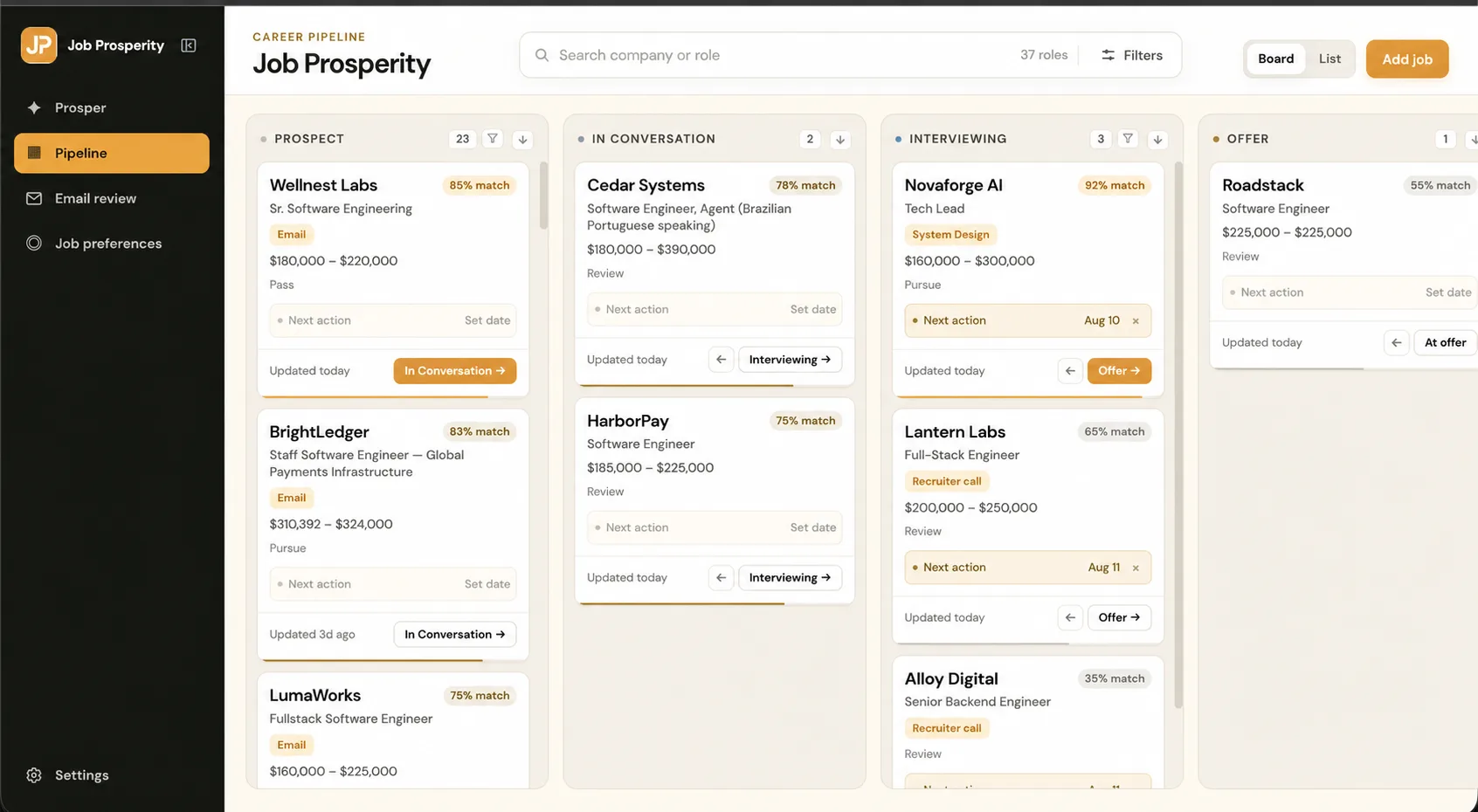
2. Build your opportunity pipeline
Add roles directly, then place them in a small set of stages. If you want a manual starting point, follow the guide on how to track job applications. When a dedicated workspace becomes useful, the application tracker provides board and list views around the same records.
Use stages that affect what you do: prospect, applied, conversation, interview, offer, and archived are enough for many searches. Each active role also gets one concrete next action. That combination tells you both where an opportunity stands and how to move your part forward.
3. Optionally review recruiting email
Google sign-in establishes an account session; Gmail is a separate, optional, read-only permission. When connected, relevant recruiting mail can enter a reviewable queue and be associated with the right opportunity. Gmail remains the source of truth, and Job Prosperity does not send messages.
You can run the entire workflow without mailbox access. The Gmail labels guide explains a manual convention, while the Gmail tracker overview describes the connected experience.
4. Work the next action, review changes, and protect privacy
Compare active roles, update stages after real events, keep interview logistics together, and record the next action you intend to take. Assisted classification or matching can help organize information already present, but it should not be confused with autonomous follow-through. Activity is attributed so you can understand and correct changes.
Use the interview tracker when a conversation is scheduled and the follow-up tracker when you need a deliberate review date. The practical application tracking guide ties these pieces into a weekly routine.
Keep privacy boundaries clear
Public marketing content is served separately from authenticated job, profile, account, and mailbox data. Optional Gmail access is limited to read-only use, and public analytics excludes career and mailbox content. You can disconnect Gmail or delete your account through application controls.
No tool removes the need to decide what you are comfortable storing. Use concise notes, verify dates against their original source, and avoid unnecessary sensitive details. The security page explains the current boundaries and links to the full privacy policy.
A short weekly review ties the five steps together: revisit preferences only when direction changes, resolve incomplete opportunity records, verify upcoming commitments, and archive work that no longer matters.
Frequently asked questions
Do I need Gmail to use Job Prosperity?
No. Start by adding opportunities directly. The optional read-only Gmail connection is available when you want recruiting messages in the same review workflow.
Does Job Prosperity apply to jobs automatically?
No. It organizes opportunities you add or review and does not submit applications on your behalf.
Can I correct an AI-assisted update?
AI-assisted activity is designed to be attributed and reviewable. Corrections and defined reversals keep you in control of your career record.
What is the best way to begin?
Set a small, consistent stage system, add your active opportunities, and give each one a concrete next action. Expand the workflow only when a real need appears.