 Job Prosperity
JOB APPLICATION TRACKER
A job application tracker built around the next action
Keep applications, recruiting conversations, interviews, and decisions in one private pipeline—without turning maintenance into another job.
A useful job application tracker answers three questions quickly: where does this opportunity stand, what happened most recently, and what should you do next? Job Prosperity keeps those answers on one opportunity record. Instead of rebuilding context from browser bookmarks, inbox searches, and scattered notes, you can review the state of your search as a pipeline.
The system is deliberately AI-assisted rather than autonomous. You can review and correct assisted updates, and you remain responsible for applications, messages, and decisions. That boundary matters when your tracker contains the working history of a career move.
Build a pipeline with stages that mean something
Stages should describe a meaningful change in the relationship with an employer. A compact sequence might include prospect, applied, conversation, interview, offer, and archived. Too many stages create classification work; too few hide the difference between waiting for a reply and preparing for a confirmed interview.
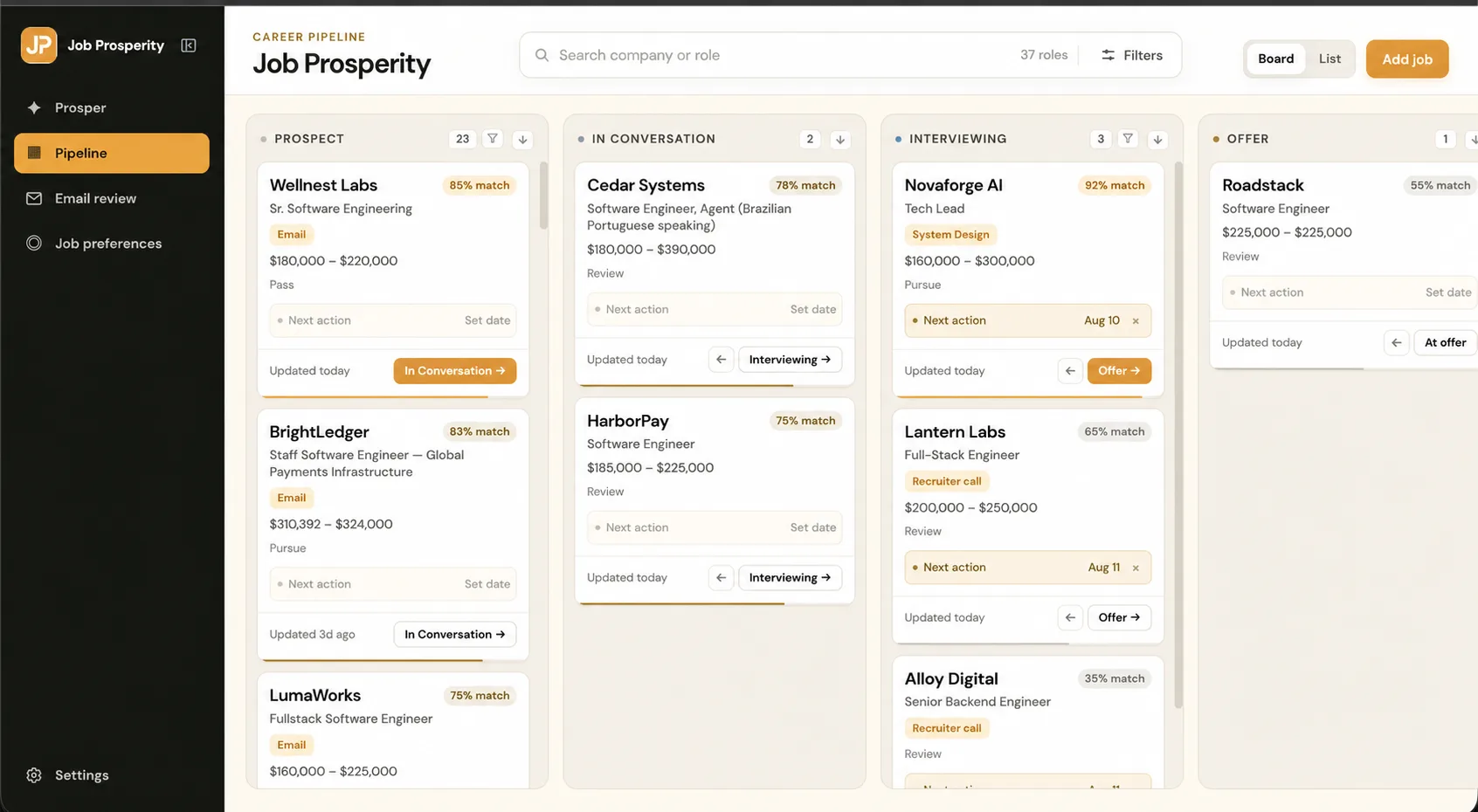
Job Prosperity provides a board and list view so you can scan the same opportunities from different angles. The board emphasizes movement between stages. The list is useful when you want to compare details across several roles. Learn how to choose a durable sequence in the guide to job application pipeline stages.
Make the next action the center of each record
A status such as “interview” describes where you are, but it does not tell you what to do. Pair every active role with a concrete next action: confirm the time, prepare two examples, send a thank-you note, or review the role on Friday. Add a due date only when it helps you make a decision. The goal is a trustworthy queue, not a calendar crowded with artificial deadlines.
During a weekly review, start with roles whose next action is missing or overdue. Decide whether each opportunity needs action, a later review date, or archiving. This approach is covered step by step in how to track job applications.
Keep messages and interviews attached to the opportunity
Recruiting activity rarely stays in one channel. A role may begin with a saved link, continue through email, and turn into several interviews. An optional Gmail job tracker can bring relevant recruiting mail into a reviewable queue while Gmail remains the source of truth. The interview tracker keeps preparation notes and confirmed stages close to the role.
This connected record reduces duplicate work. You can see why a stage changed, find the relevant context, and decide what comes next. Job Prosperity does not promise to infer every deadline or carry out the follow-through; the value is a clearer place for you to manage it.
Use a review rhythm you can sustain
Update the tracker after meaningful events, not after every thought. Then reserve ten or fifteen minutes each week to scan active roles, resolve missing next actions, check upcoming interviews, and archive dead ends. If you are starting from a spreadsheet, establish the habit first.
Career information deserves careful handling. Public marketing pages are separate from authenticated account and job data, optional Gmail access is read-only, and private fields are excluded from public analytics. Read the plain-language security and privacy overview before connecting an account.
Frequently asked questions
What should a job application tracker include?
At minimum, record the company, role, pipeline status, next action, due date, contact, source link, and notes. The useful test is whether the tracker tells you what to do next without reopening every email.
Can I track applications without connecting Gmail?
Yes. You can add and update opportunities directly. Gmail access is optional, read-only, and requested separately from Google sign-in.
How often should I update my tracker?
Update a role whenever a meaningful event occurs, then do a short weekly review. A current next action and due date matter more than a long activity diary.
Is a spreadsheet enough for a job search?
A spreadsheet can work well, especially for a small search. A dedicated tracker becomes useful when messages, interviews, notes, stages, and follow-ups are difficult to keep connected.